Migrating a Legacy PHP ERP/CRM to the Cloud: Architecture, Strategy, and Lessons Learned
A detailed technical walkthrough of migrating a business-critical PHP ERP/CRM from a single in-office server to managed cloud infrastructure using binary-log replication — with only ~10 minutes of user-visible downtime and zero data loss.
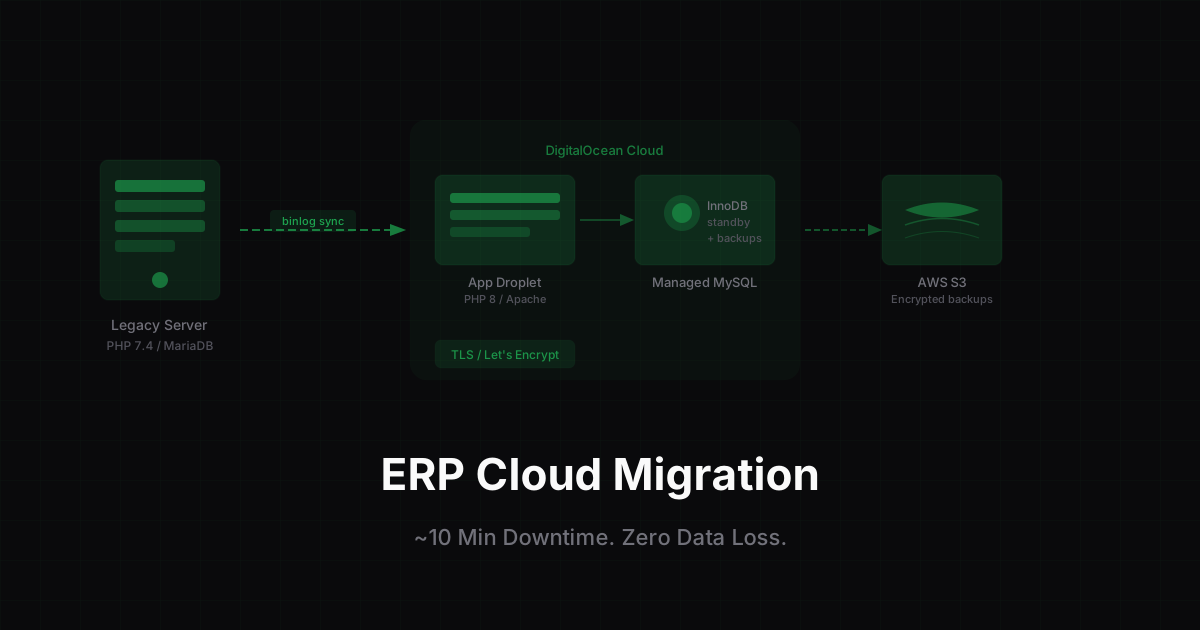
Every engineer eventually faces a migration that can't go wrong. This was mine.
Scuderia Car Parts Ltd — an automotive parts distributor — had been running its entire business on a single in-office CentOS server. Sales, inventory, shipping, warehouse operations, and finance all ran through a custom PHP ERP/CRM that had been built and extended over many years. When that server went down — and it had, more than once due to power cuts and ISP issues — trading stopped completely.
The brief I was handed: move this system to the cloud before the next incident. No extended downtime, no data loss, no disruption to the team.
This post is a full technical account of how I planned and executed that migration.
The Legacy Environment
Before designing a target architecture, it's worth understanding exactly what we were working with.
The platform ran on a CentOS server with cPanel, using MariaDB and Apache. The application was a mature PHP 7.4 codebase with the following characteristics:
- No Composer — vendor libraries managed manually.
- A large MySQL schema with a mix of InnoDB and MyISAM tables.
- Third-party integrations: DHL and FedEx shipping APIs, accounting exports, and product feeds.
- Scheduled jobs via
crontab— backups, stock syncs, and daily reporting. - Users connecting both from the office and from remote warehouses throughout the working day.
Several pressures had stacked up simultaneously:
- The OS and PHP version were approaching end-of-life, with no security updates ahead.
- The server was a single point of failure — one hardware, power, or ISP incident halted all trading.
- Disk space was chronically low, making
mysqldumpexports increasingly fragile. - A full server failure recovery would have taken hours, not minutes.
Defining Success Before Writing a Line of Code
Before planning anything, I wrote down explicit, measurable success criteria:
- ≤10 minutes of user-visible write downtime during cut-over.
- Zero data loss — every order, invoice, and stock movement present on the old server must exist on the new one.
- PHP runtime upgraded to a version with multi-year support ahead.
- Database on a managed service with automated backups and point-in-time recovery.
- All integrations working identically after cut-over — DHL, FedEx, accounting exports, cron jobs.
- A documented rollback plan at every stage.
Having these written down kept every decision objective. When trade-offs came up, we could evaluate them against the criteria rather than by feel.
Target Architecture
The new environment was designed around three principles: separation of concerns, managed services wherever the operational overhead isn't worth it, and repeatability.
| Component | Choice | Reason |
|---|---|---|
| Application server | DigitalOcean Droplet | PHP 8, Apache, Git-deployed codebase |
| Database | DigitalOcean Managed MySQL | Automated backups, standby node, private networking |
| Off-site backups | AWS S3 | Fully independent of the cloud provider |
| TLS | Let's Encrypt | Automatic renewal, zero cost |
| Secrets management | Environment-level config | Credentials out of application code |
| Observability | Centralised logs + slow-query log | Disk/CPU alerts, query tuning baseline |
The managed database was the most significant architectural decision. DigitalOcean Managed MySQL removes the need to run your own replication, patching, and failover. For a small team operating a business-critical system, that trade — some tuning flexibility in exchange for a lot of operational safety — is well worth making.
Private networking between the application server and database means the database port is never exposed to the public internet, which also satisfied the security requirements out of the box.
Migration Strategy: Why a Simple Dump-and-Restore Wasn't an Option
The database was several gigabytes in size. The business trades throughout the working day. A traditional cut-over — stop the old server, take a dump, restore it on the new one, switch DNS — would have required hours of downtime. That was immediately ruled out.
Instead, I used a phased binary-log replication strategy:
- Take a consistent snapshot of the production database, recording the exact binary log position.
- Restore the snapshot on the new managed MySQL instance.
- Set up the new database as a replica, continuously replaying every transaction from the old server.
- On cut-over day, wait for replication lag to reach zero, then flip.
By the time we cut over, the two databases were within seconds of each other. The user-visible outage — the window where writes were disabled — was the time it took to drain replication lag and redirect traffic. In practice: approximately 10 minutes.
Phase-by-Phase Execution
Phase 1 — Dress Rehearsal
Before any production data was touched, I stood up the complete new stack in staging: Droplet provisioned, managed MySQL instance running, codebase deployed from Git, all cron jobs configured.
I restored a copy of the production database into the managed MySQL instance and ran every application flow end-to-end — logins, stock lookups, order creation, shipping label generation, accounting exports. Every environment issue that surfaced here was fixed in staging, not on cut-over day. There were several.
Phase 2 — Consistent Snapshot
The production snapshot needed to be taken without locking the database for longer than a few seconds. The old server also didn't have enough free disk for a full uncompressed dump — so rather than the usual dump-locally-then-upload approach, I streamed the dump directly to AWS S3:
mysqldump --single-transaction --routines --triggers \
    --master-data=2 --databases erp \
  | gzip -c \
  | aws s3 cp - s3://scuderia-backups/erp-baseline.sql.gz
--single-transaction ensures InnoDB consistency without a full table lock. --master-data=2 embeds the binary log file name and position as a comment in the dump — that position is where replication starts in Phase 3. The dump was also now stored as a durable, compressed, off-site baseline independent of both servers.
Phase 3 — Continuous Replication
With the baseline restored on the managed MySQL instance, I configured it to replay binary-log events from the old MariaDB server starting at the recorded position. Under normal operating load, replication lag stayed under one to two seconds. The new environment was live-tracking every transaction while the business kept trading normally.
Phase 4 — Cut-Over
The cut-over sequence was documented step-by-step in a runbook:
- T−60 min: Final rehearsal walk-through, verify replication lag is at zero, confirm backups are current on both environments.
- T−0: Enable read-only mode on the old application. Wait for replication lag to drain completely.
- T+~2 min: Repoint the application configuration and DNS to the new environment. Re-enable writes.
- T+~10 min: Smoke tests green — login, stock lookup, order creation, DHL label, FedEx label, accounting export.
Total user-visible write outage: approximately 10 minutes.
Phase 5 — Validation and Decommission
The old server stayed online as a read-only standby for a defined grace period. We reconciled row counts, daily financial totals, and a random sample of recent orders between the two environments. No discrepancies. Only then was the old server archived and shut down.
Technical Challenges
The happy path is never where the real work is. Here's what actually needed solving.
1. No Disk Space for a Local Dump
The old server had insufficient free disk to hold an uncompressed mysqldump. The streaming approach above solved this — nothing large ever touched local disk, and it produced a durable offsite snapshot as a side effect.
2. MyISAM Tables
Several legacy tables were still MyISAM. Managed MySQL strongly prefers InnoDB: MyISAM doesn't support transactions, crashes uncleanly, and doesn't participate in point-in-time recovery. Leaving those tables in place would have undermined the reliability gains of the new platform.
I converted every MyISAM table to InnoDB in a controlled maintenance window ahead of the migration, using scripted ALTER TABLE statements run one table at a time rather than a bulk operation:
ALTER TABLE legacy_table ENGINE=InnoDB;
Row counts and indexes were validated after each conversion before proceeding to the next.
3. Strict SQL Mode and Collation Mismatches
Managed MySQL runs with a stricter SQL mode and a different default collation than legacy MariaDB. Without fixes, queries that had run without errors for years started failing — zero dates, implicit type coercions, and collation mismatches on JOINs.
The resolution involved three passes:
- Audit the schema and normalise all tables to a consistent collation (
utf8mb4_unicode_ci). - Identify and fix application queries relying on lenient mode behaviour.
- Full regression pass against the staging copy before touching production.
No sql_mode hacks or compatibility flags — everything was fixed in the application and schema.
4. GTID and Replication Errors
Setting up binary-log replay between a MariaDB source and a managed MySQL target exposed subtle differences in how the two systems identify and replay transactions. GTID-related errors on specific event types caused replication to pause and required manual intervention.
Each error was diagnosed by inspecting replication status and the event in question, the metadata was corrected, and the replica resumed from the correct position. Stricter checks were added so events in the same error class would fail fast rather than silently drift.
5. PHP 7.4 → 8.x Compatibility
The new server ran a modern PHP runtime. The legacy codebase had accumulated a number of PHP 7.4-era patterns that either produced deprecation warnings or outright errors under PHP 8 — passing null into string functions, implicit type coercions, and a small number of removed behaviours.
The approach:
- Enable
E_ALLerror reporting on staging and walk every high-traffic flow. - Fix compatibility issues in code — not by downgrading PHP or setting
error_reporting = 0. - Add targeted logging for edge cases so any remaining issues would surface loudly in the first days post-cutover.
6. Very Large Tables
Several tables — audit logs, historical stock movements, integration payloads — were multi-gigabyte individually. Standard mysqldump tooling was fragile for these.
These tables were exported separately as CSVs via the server-side MySQL CLI, transferred with resumable tooling, and loaded directly into the managed instance. This bypassed the memory and time overhead of treating them as part of the main dump stream.
7. Cron Jobs and PATH
After cut-over, an S3 backup cron job silently failed. The cause: cron on the new server runs with a minimal PATH that didn't include the AWS CLI binary location.
The fix was an explicit PATH declaration in the crontab entry and absolute binary paths in the backup script:
PATH=/usr/local/bin:/usr/bin:/bin
0 2 * * * /usr/local/bin/aws s3 cp /var/backups/erp.sql.gz s3://scuderia-backups/daily/
A failure notification was also added — a silent cron failure that goes undetected for days is a data protection incident waiting to happen.
8. Apache, TLS, and PHP Session Tuning
Several smaller but operationally important items were addressed on the new server:
- Apache VirtualHosts with separate access and error logs per site.
- Let's Encrypt certificates with automatic renewal via
certbot. - PHP session lifetime (
gc_maxlifetimeandcookie_lifetime) tuned so warehouse users weren't being logged out mid-task. - Error log rotation configured — an earlier incident had allowed an unchecked error log to grow to tens of gigabytes.
Results
Reliability
The ERP/CRM no longer depends on a single in-office server, ISP line, or power circuit. Managed MySQL provides a standby node, automated daily backups, and point-in-time recovery that the legacy stack never had. Encrypted off-site backups to AWS S3 provide a second-location copy fully independent of the cloud provider.
Performance
Moving to PHP 8 improved render times on several heavy pages and unlocked modern language features for future development. The slow-query log on Managed MySQL provided an immediate baseline for identifying queries that had always been slow but never measured.
Security
HTTPS is enforced everywhere via Let's Encrypt with automatic certificate renewal. Database access is restricted to the application server over a private network. Credentials have been rotated out of legacy inline configuration.
Business Impact
- ~10 minutes of user-visible write downtime during cut-over.
- Zero data loss — every order, invoice, and stock movement preserved and reconciled.
- The team can now ship changes faster in a version-controlled, reproducible environment.
Lessons Learned
Rehearse until the cut-over is boring. Every problem that was going to bite us in production bit us in staging first. By the time cut-over day arrived, we had run the same sequence three or four times. That's what makes a 10-minute outage feel calm rather than chaotic.
Stream, don't stage, when disk is tight. Piping a dump through gzip directly into S3 is more reliable than hunting for local disk space, and produces a durable compressed off-site baseline as a bonus.
Combine the PHP upgrade with the server move. Two separate projects mean two outages and two risk windows. With enough rehearsal, doing both simultaneously is lower total risk than sequencing them.
Build alerting into cron from day one. Minimal PATH, missing failure notifications, and silent exits will eventually cost you a backup. Treat unmonitored cron jobs as a data protection risk.
Managed services earn their keep. For a small team running a business-critical system, the operational work that Managed MySQL removes — patching, failover, backup scheduling, replication management — is real work with a real cost. The trade is worth it.
Document the rollback. Knowing, in writing, exactly how to revert at each stage kept cut-over day decisions calm rather than reactive.
Conclusion
The ERP/CRM system now runs on a modern, managed, cloud-native stack. It is more reliable, more secure, and easier to evolve than the in-office server it replaced — delivered with approximately 10 minutes of user-visible downtime and no data loss.
More importantly, the foundations are in place for what comes next: deeper automation, further performance tuning, and tighter integration with the shipping, warehouse, and accounting systems around it. None of that was practical on the legacy server. All of it is straightforward now.
The best migration is one that looks unremarkable from the outside. Users should open the system the next morning and notice nothing — except that it is a bit faster.
Questions about cloud migrations, managing legacy PHP in production, or MySQL replication? Feel free to reach out.